Homebrew dashboard for the PSP

PSphere

A modern home screen for a classic handheld. Games, videos, music, photos, apps, Wi-Fi and settings, one press of R apart.
See it in action Get PSphere

Games

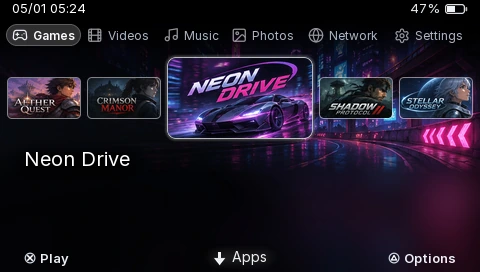
Every game, one carousel.

UMD discs, ISO, CSO and homebrew side by side, with their cover art, ready the moment PSphere opens.

  • →Launches UMD discs, ISO, CSO and homebrew
  • →Cover art cached for instant starts
  • →Press down for the Apps row

Videos

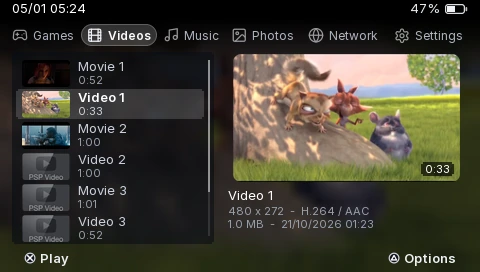
A real video player.

Your MP4s with a live preview, subtitles and a memory for where you stopped.

  • →Resumes where you left off
  • →.srt subtitles found and loaded automatically
  • →R / L skip to the next or previous video

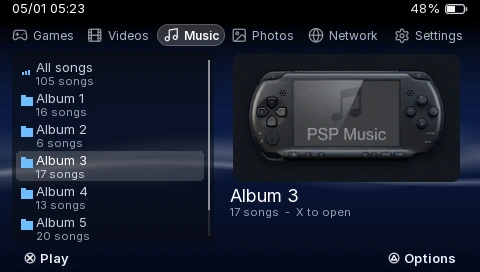
Music

Music that follows you.

Start a song and keep browsing: a small strip at the top shows what is playing in every category.

  • →Background playback everywhere
  • →Shuffle, repeat, equalizer and sleep timer
  • →Seven strip colours to match your background

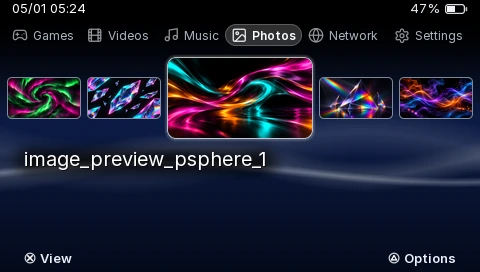
Photos

Your pictures, up front.

A thumbnail carousel of your PICTURE folder and a fullscreen viewer.

  • →Thumbnails cached after the first look
  • →Fullscreen viewer
  • →Any photo can become the menu background

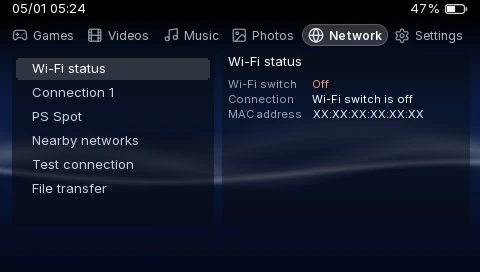
Network

Wi-Fi without the XMB.

See your connection, join a new network and move files over Wi-Fi.

  • →Scan and join nearby networks
  • →Connection and internet test
  • →FTP access to the Memory Stick

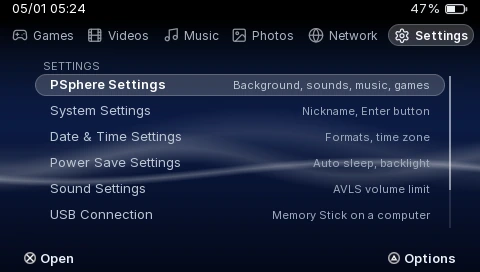
Settings

Everything in one place.

PSphere’s own options next to the system settings you would otherwise open the XMB for.

  • →Backgrounds, sounds and game order
  • →Date & time, power saving, nickname
  • →USB connection and system information

Apps

One row down: apps.

Press ↓ in Games for PSphere’s built-in apps, next to any homebrew tools you move there.

  • →Camera, Files and Saves
  • →Clock, Calculator and Maps with GPS
  • →Press ✕ to open one, ○ to come back

L / R or scroll: categories · D-pad, ✕ ○ △: explore PSphere · VOL − +: volume

Apps

One row down, a few more things.

Press down in Games for the Apps row: PSphere’s own apps, plus any homebrew tools you move there.

Camera

Photos and movies with the PSP camera, using the XMB camera’s own settings.

  • →Photo and movie modes
  • →Effects, white balance and exposure
  • →Review what you shot

Files

A file manager for the Memory Stick, built for moving many files at once.

  • →Mark files with SELECT, then copy or move
  • →Opens pictures, music, videos and text
  • →Warns before touching system folders

Saves

Your game saves with their own artwork, and backups you can bring back.

  • →Back up one save or all of them
  • →Restore any backup
  • →Delete saves safely

Clock

A clock that follows your PSP’s time settings, with everything around it.

  • →Daily alarms with snooze
  • →Timer and stopwatch with laps
  • →Sleep timer that fades the music out

Calculator

A pocket calculator driven by the D-pad, with shortcuts on the other buttons.

  • →12 digits with thousands separators
  • →Square root, percent and x²
  • →Keeps or clears your last sum

Maps

Offline maps of your country on the Memory Stick, in a bright or a dark style, with GPS and routes.

  • →Map packs for European countries and US states
  • →Your position with the PSP-290 GPS receiver
  • →Routes by car with time and distance

Map data © OpenStreetMap contributors.

Small things, done right.

Starts with the console

With ARK-5’s autoboot, PSphere is the first thing you see after power-on and after every game.

Back from a game, fast

The game list is saved, so PSphere shows it at once and checks for changes in the background.

Remembers where you were

The last game stays highlighted, videos resume, and music reopens at your last song.

Make it yours

Animated wave, XMB colours, the XMB wallpaper or your own photo as the background, plus three sound sets.

Built carefully

A user-mode app: no firmware files replaced, and every system setting it changes is backed up first.

Made for the original

Tuned for the PSP-1000’s 32 MB of memory and 480 × 272 screen, and tested on the PSP-3000 too.

Discs welcome

Put in a UMD and it slides into the game list; take it out and it leaves.

Volume you can see

A TV-style volume bar shows on every PSphere screen while you change it.

Get PSphere

One file. Copy it to your Memory Stick and start it like any homebrew.

Console
PSP-1000 and PSP-3000 (tested). Other models untested.
Firmware
6.61 with ARK-5 custom firmware (tested). Other versions untested.
Storage
Memory Stick with a few MB free
Download — coming soon